4K Pocket Gimbal Action Cameras vs. 360° AI Auto-Tracking Phone Stands: Which Stabilizer Should You Buy? (2026)
Editorial transparency: Independent hardware guide. Direct store orders include free US tracked shipping and a 30-day warranty; external partner links may earn a commission at no extra cost to you.
Solo video creators face two completely different stabilization challenges depending on where they shoot: when you are walking down cobblestone streets or filming travel B-roll, your footsteps transmit vertical bounce into handheld phone footage; when you are filming a cooking tutorial, workout routine, or workbench teardown across a room, a static tripod cuts off your head the moment you step two feet to the left.
Rather than forcing one bulky clamp rig to do both jobs poorly, smart creators choose between a dedicated 4K pocket gimbal camera for run-and-gun motion and an app-free 360° AI optical face-tracking stand for hands-free studio recording. Here is how each stabilizer works and which fits your content style.
Solo Creator Stabilization & Mounting Hardware Comparison
| Stabilizer / Mount Pick | Stabilization & Tracking System | Sensor / Device Compatibility | Best Shooting Scenario | Action |
|---|---|---|---|---|
| 4K Handheld Pocket Gimbal Camera w/ Rotatable Screen | Mechanical Brushless Gimbal Head + Rotatable Touch IPS | Built-in 4K Ultra HD Sensor (Saves Phone Battery & Storage) | Walking vlogs, travel POV, B-roll & street interviews | VIP 1-Click ($70.19 w/ WELCOME10) → |
| Robo 360° AI Auto Face & Motion-Tracking Phone Stand | Built-In Optical AI Vision Sensor + 360° Motorized Pan | All iPhones & Android Phones (Zero App or Bluetooth Required) | Solo TikTok/Reels, kitchen demos, fitness & Zoom calls | VIP 1-Click ($56.69 w/ WELCOME10) → |
| Bracketron PwrUp MiT Grip Qi Fast-Charging Car Mount | Vibration-Damped Suction Arm + Auto-Clamping Qi Cradle | Qi Wireless Charging Smartphones (Dashboard & Windshield) | Hands-free GPS navigation & in-car creator commentary | VIP 1-Click ($75.59 w/ WELCOME10) → |
| DJI Osmo Pocket 3 1-Inch CMOS Gimbal (Amazon Prime) | 3-Axis Brushless Gimbal + 2" Rotatable OLED | 1-Inch CMOS Sensor (4K/120fps) | Professional low-light commercial filmmaking | Check Prime Price → |
1. Why a Dedicated 4K Pocket Gimbal Camera Beats Clamping Your Phone Into a Heavy Rig
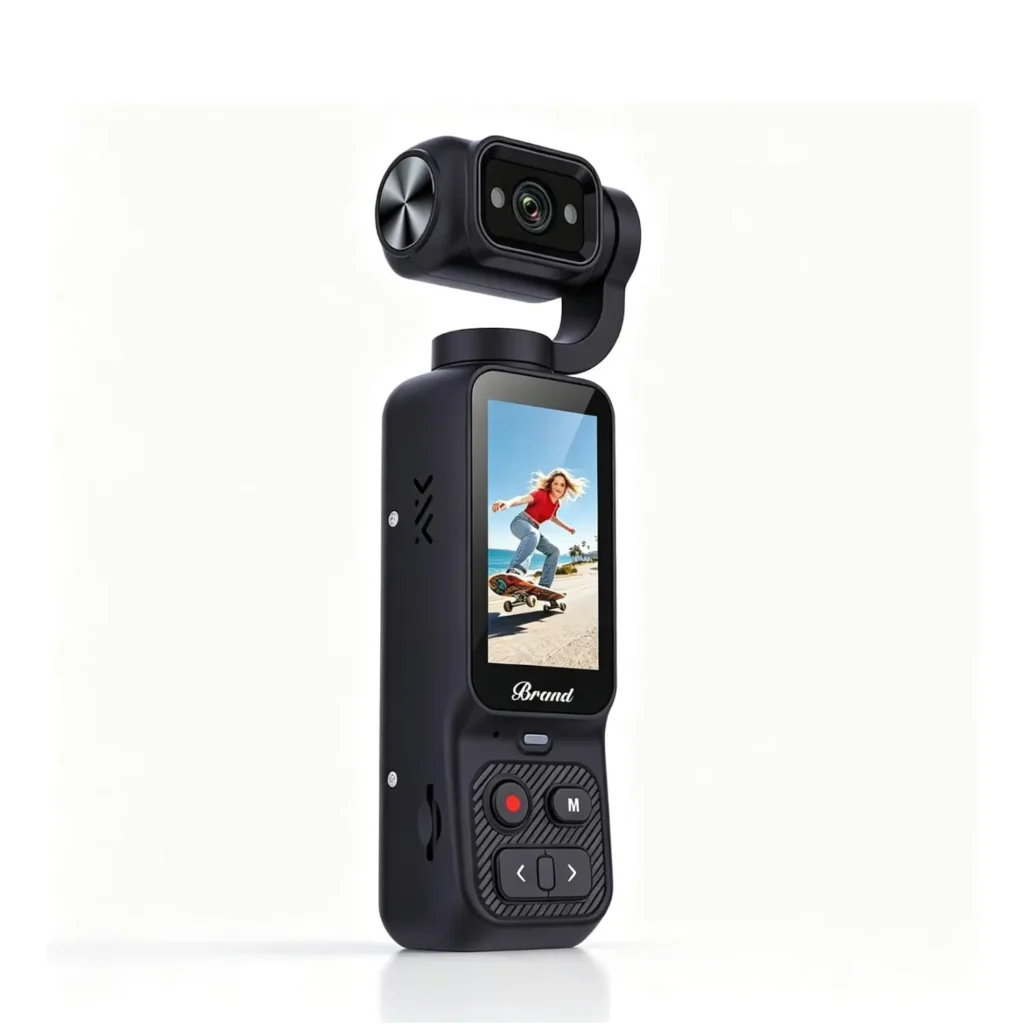
Full-size smartphone gimbals work well on a film set, but in real life they require removing your phone case, balancing counterweight arms for three minutes, draining your phone’s battery, and pausing your shoot every time a text or phone call comes in. By contrast, the 4K Stabilized Handheld Pocket Gimbal Action Camera with Rotatable Touchscreen ($77.99, ships fast from US warehouse) weighs less than a candy bar, slips into a shirt pocket, and powers up ready to record stabilized 4K footage in seconds.
Because it writes directly to its own microSD card and features a rotatable touchscreen for instant horizontal (16:9 YouTube) or vertical (9:16 TikTok/Reels) framing, your smartphone stays free in your pocket with 100% battery for navigation and boarding passes.
Not sure what size microSDXC card you need for 4K/60fps recording on a week-long trip? Run your bitrate and resolution through our 4K Video & RAW Photo Storage Capacity Calculator.
2. How App-Free 360° AI Vision Stands Track You Across Any App
Bluetooth-dependent tracking mounts force you to record inside a proprietary companion app—which means you cannot use native TikTok filters, Instagram Live, FaceTime, WhatsApp Video, or Zoom. The Robo 360° AI Auto Face & Motion-Tracking Smartphone Gimbal Stand ($62.99) embeds its own dedicated optical vision camera and neural tracking chip directly inside the base of the stand.
Simply clamp your phone in portrait or landscape, show an “OK” hand gesture to start tracking (or an open palm to pause), and the motorized base silently pans 360 degrees to keep you centered in frame regardless of which camera or livestreaming app is open on your phone. And when your shoot moves to the road, the PwrUp MiT Grip Qi Fast Wireless-Charging Dashboard & Windshield Car Mount ($83.99) locks your phone securely at eye level while topping up your battery wirelessly at up to 15W.
Framing Vertical (9:16) vs. Horizontal (16:9) Without Cropping Resolution
One of the biggest mistakes creators make when shooting for both YouTube (16:9 widescreen) and TikTok/Reels/Shorts (9:16 vertical) is filming horizontally in 1080p and cropping the center third in editing—which throws away 68% of your sensor’s horizontal pixels and leaves vertical video looking blurry. With a rotatable-screen 4K Pocket Gimbal Action Camera or a portrait-clamped Robo 360° AI Tracking Stand, you capture native full-sensor vertical resolution for short-form feeds—or record full 4K (3840×2160) so even a vertical crop retains crisp 1080p clarity.
Audio Sync Tips When Filming Across the Room
When an AI tracking phone stand follows you 8 feet away across a kitchen island or home gym, your phone’s built-in microphone is too far away to isolate your voice cleanly. Pair your tracking stand with a clip-on wireless lavalier microphone or record desktop voiceovers with our 5 Core Cardioid Studio Microphone Kit so your audio matches your stabilized visuals.
Frequently Asked Questions
How do I walk with a pocket gimbal camera to get a floating cinematic look?
A 3-axis gimbal cancels pitch, yaw, and roll tilts automatically, but to eliminate vertical up-and-down “Z-axis” bobbing from heavy footsteps, bend your knees slightly and roll smoothly from heel to toe (“ninja walk”) while holding the gimbal handle at chest height.
Does the Robo 360° AI Auto-Tracking Stand require Wi-Fi or a smartphone app?
No—all face and body recognition happens locally inside the stand’s built-in optical AI lens and processor, so it works out of the box with your native Camera app, TikTok, Instagram, Zoom, and FaceTime with zero Bluetooth pairing.
Can I mount the AI tracking phone stand onto a taller floor tripod?
Yes, the bottom base of the Robo 360° AI Gimbal Stand includes a universal 1/4″-20 threaded tripod socket so you can screw it onto any standard camera tripod or light stand for standing-height workouts and presentations.
What microSD card speed class is required for smooth 4K pocket gimbal recording?
Always use a microSDHC or microSDXC card rated UHS Speed Class 3 (U3) / Video Speed Class V30 (up to 64GB–128GB depending on camera slot specs) so sustained 4K video frames write cleanly without dropped frames.